Managing Kubernetes
There may come a time, when you will need to exec or attach yourself to a Kubernetes container to see what is happening from within. It's all quite straightforward, albeit not intuitive, but here's where this tutorial might come in handy. So without further ado let's get into it.
Azure
To access the Kubernetes, you should first see if you've got Azure CLI installed.
- On Windows:
winget install -e --id Microsoft.AzureCLI
- On Mac:
brew install azure-cli
If you run into any issues, please refer to Azure CLI Docs
You should now login using the following command and then selecting your computer user:
az login
Finally, in order to be granted the access to the Kubernetes, we also need to request for
Elevated Privileges. When on page, you should click Activate next to ROLE_AAD_BIDS_COTR_PIM
and in the sidebar menu fill in the Reason

Kubernetes
We are ready to authenticate, but we haven't yet prepared our Kubernetes environment, so let's first install
- On Windows:
winget install -e --id Kubernetes.kubectl
winget install -e --id Microsoft.Azure.Kubelogin
- On Mac:
brew install kubectl
brew install kubelogin
Connecting pieces together
Now that we've got the prerequisites ready, we need Kubernetes to "inherit" some settings from Azure CLI:
# let's clear existing tokens (if there are any)
kubelogin remove-tokens
# let's select the correct subscription (although this may vary)
az account set --subscription "Gjensidige Production Modern"
# finally, let's get the credentials
az aks get-credentials --name aks-apps-int-prod-011 --resource-group gpm-plt-aks-apps-int-en-prod-rg
The result should look something like this:

Do note that the cluster name or even a resource group can change. You can find the latest one at GAP website
Finally
Using kubernetes themselves would be beyond this post, but I will leave Tor's suggestion of K9S here.
It can help you do simple stuff with an in-terminal and very cool looking graphical interface:
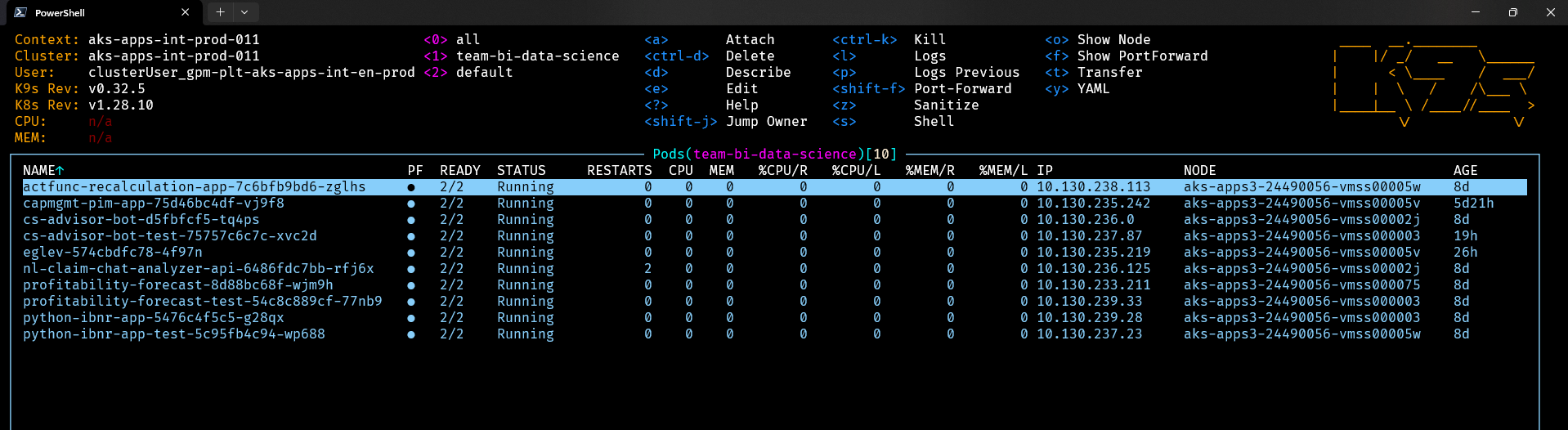
We can install that using:
- On Windows
scoop install k9s
- On Mac
brew install k9s